

Visit Japan Web is a Japanese government web service that allows you to register the information required for entering Japan online in advance.
In this article, we’ll explain how to register for Visit Japan Web, how it differs from the Japan Entry Card, whether you need to download an app, and what to expect after arriving in Japan, in an easy-to-understand way for first-time users.
What is Visit Japan Web?
Benefits of using Visit Japan Web
What you need to register for Visit Japan Web
How to register for and use Visit Japan Web
Do you still need to fill out a Japan Entry Card if you use Visit Japan Web?
Do you need to download an app for Visit Japan Web?
Entry procedures and customs declaration after arriving in Japan
Final checklist before arriving in Japan
Things to keep in mind when using Visit Japan Web
Frequently asked questions about Visit Japan Web (FAQ)
Having a phone number can give you peace of mind during your stay in Japan
Want to prepare a Japanese phone number in advance? Choose HanaCell
Summary: Register Visit Japan Web in advance for a smoother arrival in Japan
What is Visit Japan Web?
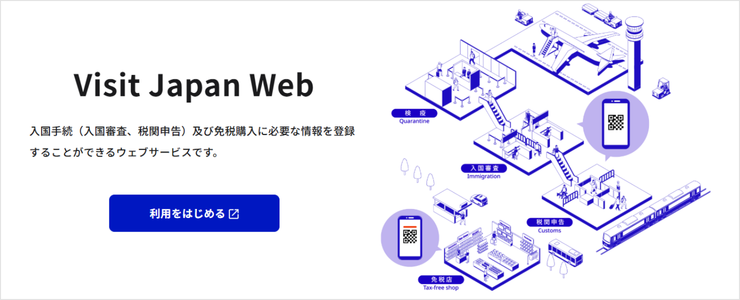
Visit Japan Web is a Japanese government web service that allows you to register the information required for entering Japan online in advance.
You can register the “Disembarkation Card for Foreigner” required for immigration procedures, as well as the “Declaration of Accompanied Articles and Unaccompanied Articles” required for customs declaration, in advance.
Once registration is complete, QR codes for use during immigration and customs procedures will be issued.
Benefits of using Visit Japan Web
Using Visit Japan Web can save you the hassle of filling out paper immigration and customs declaration forms on the plane or at the airport.
If you complete the registration in advance, you only need to present your QR code during immigration and customs procedures, making it easier to complete the necessary procedures smoothly after arriving in Japan.
It is especially recommended for first-time visitors to Japan and those traveling with family who want to make the arrival process as simple as possible.
What you need to register for Visit Japan Web
Before you start the registration process, make sure you have the following information ready.
- Email address
- Passport
- Information about your flight to Japan
- Address and contact information during your stay in Japan
- A smartphone or computer with an internet connection
Passport
During registration, you will need to enter information such as your name, nationality, and passport number. Keep your passport handy and enter the information exactly as it appears on your passport.
Information about your flight to Japan
You will need to register your airline name, flight number, scheduled arrival date, and other information. Having your flight booking confirmation email ready will make the process easier.
Address and contact information during your stay in Japan
You will need to register the name and address of your hotel or other accommodation, as well as your contact information while staying in Japan. If you are staying at a hotel, it is helpful to have your booking confirmation email ready while entering the information.
Smartphone or computer
Visit Japan Web is a web service, so you do not need to download a dedicated app. You can register using either a smartphone or a computer.
However, you will need to present your QR code during immigration procedures after arriving in Japan, so make sure you can display the QR code on your smartphone. It is also a good idea to check your internet connection and smartphone battery in advance so that you can stay connected after arriving in Japan.
How to register for and use Visit Japan Web
Here, we’ll walk you through the Visit Japan Web registration process step by step.
STEP1:Access Visit Japan Web and create an account
Source: Visit Japan Web | Digital Agency Web Services and Applications
First, visit the official Visit Japan Web website and select “Create New Account” to register your email address and password.
A verification code will be sent to the email address you registered. Enter the code by following the instructions on the screen.
When using Visit Japan Web, make sure to use the official website. Be careful of suspicious apps and websites.
STEP2:Register your personal information
After creating your account, register your “Personal Information”.
For your passport information, you can choose to scan your passport with your camera or enter the information manually. If the camera scan does not work properly, you can check your passport and enter the required information directly.
Check that all the information you entered is correct, then follow the on-screen instructions to complete the registration.
STEP3:Register your arrival・return schedule
After registering your personal information, register your planned arrival in or return to Japan.
You will mainly need to enter the following information.
- Planned arrival date in Japan
- Airline name・flight number
- Address during your stay in Japan
- Name・address of your accommodation
- Contact information in Japan
STEP4:Register information for immigration and customs declaration
After registering your arrival・return schedule, enter the information required for immigration, quarantine, and customs declaration.
Answer the questions shown on the screen and check the information you have entered.
For the customs declaration, you will be asked about items you plan to bring into Japan, so make sure you have the necessary information before answering the questions.
STEP5:Prepare your QR code
Once you have completed all the required registrations, make sure you are ready to display the QR code used for the immigration procedures.
To make sure you can display it immediately after arriving in Japan, it is a good idea to check in advance that you can log in to Visit Japan Web and that your smartphone has enough battery.
Do you still need to fill out a Japan Entry Card if you use Visit Japan Web?
If you register the required information in advance through Visit Japan Web, you do not need to fill out a paper Japan Entry Card.
You will mainly register the following information.
- Personal information such as your name and date of birth
- Passport information
- Your flight to Japan
- Purpose of your visit
- Planned length of stay in Japan
- Address and contact information during your stay in Japan
Visit Japan Web also allows you to register the information required for customs declaration online.
If you are wondering “Where can I get a Japan Entry Card?” “Do I need to fill it out on the plane?”, registering for Visit Japan Web before departure can give you peace of mind.
Do you need to download an app for Visit Japan Web?
No. Visit Japan Web is not a dedicated app but a web service that you can access through a web browser. Simply access the official website from a browser on your smartphone or computer.
When using Visit Japan Web, be careful of suspicious apps and websites.
Fake apps and websites pretending to be Visit Japan Web have been identified. When using the service, make sure to access it through the official Visit Japan Web website provided by the Digital Agency.
Do not install unfamiliar apps or enter your credit card information.
Visit Japan Web is a web service, not an app. If you are asked to download an app or enter credit card information, be careful as it may be a fake website or app.
Entry procedures and customs declaration after arriving in Japan
Once you have completed your Visit Japan Web registration, you can use your registered information to proceed with immigration and customs procedures after arriving in Japan.
STEP1:Display your Visit Japan Web QR code
After arriving at a Japanese airport, access Visit Japan Web on your smartphone and display the QR code used for immigration and customs procedures.
STEP2:Present your QR code and passport
Follow the airport’s instructions to complete the immigration and customs procedures.
At airports with joint kiosks, you will scan your QR code and passport, then register information such as your fingerprints and facial photo.
If you do not use a joint kiosk, you can present your QR code at an immigration counter or electronic declaration terminal. Follow the airport’s instructions to complete the necessary procedures.
STEP3:Go through immigration
At the immigration area, you will undergo immigration inspection by an officer.
Keep your passport and any other required documents ready so that you can present them immediately.
STEP4:Complete your customs declaration
After immigration, proceed to the customs area.
If you have registered your customs declaration information through Visit Japan Web, follow the airport’s instructions to complete the procedure.
STEP5:Enter Japan after completing the procedures
Once you have completed immigration and customs procedures, proceed to the airport exit.
Final checklist before arriving in Japan
To make the procedures after arriving in Japan go smoothly, check the following in advance.
- Visit Japan Web registration is complete
- You can display your QR code
- You can quickly take out your passport
- Your smartphone has enough battery
- You can connect to the internet after arriving in Japan
In particular, make sure your smartphone is ready to use so that you can display your QR code.
Things to keep in mind when using Visit Japan Web
Visit Japan Web allows you to register the information required for immigration and customs procedures before arriving in Japan. To make the process as smooth as possible, keep the following points in mind.
1. Check that your registration information is correct
Make sure you enter your name, passport number, flight information, accommodation details, and other information correctly.
It is especially important to double-check your passport and flight information after completing your registration.
2. Complete your registration before arriving in Japan
You can still use Visit Japan Web after arriving in Japan, but we recommend completing your registration before departing for Japan rather than trying to register in a hurry at the airport.
Once your flight and hotel reservations are confirmed, prepare the required information and complete your registration in advance.
3. Make sure you can display your QR code
To avoid any problems after arriving in Japan, make sure you can log in to Visit Japan Web in advance.
It is also important to make sure your smartphone is sufficiently charged.
Some actions, such as logging in or registering a new arrival・return schedule, require an internet connection. Having a reliable internet connection available after arriving in Japan will give you peace of mind.
4. Use the official website
When using Visit Japan Web, always access it through the official website.
Authorities have issued warnings about suspicious apps pretending to be Visit Japan Web, so avoid installing unfamiliar apps.
5. Visit Japan Web alone does not allow you to enter Japan
Visit Japan Web is a web service designed to make procedures such as immigration and customs declaration smoother.
Even if you register your information in advance, you still need to complete the necessary procedures according to the airport’s instructions after arriving in Japan.
Registering with Visit Japan Web does not mean that all immigration and customs checks will be skipped.
Frequently asked questions about Visit Japan Web (FAQ)
Is registration for Visit Japan Web free?
When should I register for Visit Japan Web?
If I am traveling with my family, does each family member need to register separately?
Do I need to download an app for Visit Japan Web?
Do I need to register for Visit Japan Web to enter Japan?
However, using Visit Japan Web allows you to register the information required for immigration and customs procedures in advance, making it easier to complete the procedures smoothly after arriving in Japan.
Can I change my information after registering for Visit Japan Web?
In particular, if your flight or accommodation details have changed, it is a good idea to make sure your registered information is up to date.
Do I need a Japanese phone number to register for Visit Japan Web?
Also, having a phone number can be useful during your stay in Japan, such as when using services that require SMS verification. If necessary, consider preparing a phone number that you can use in Japan in advance.
Having a phone number during your stay in Japan can give you peace of mind
When traveling to Japan, many people may feel that mobile data alone is enough.
However, having a Japanese phone number can make it easier to use certain local services.
For example, a Japanese phone number can be useful in the following situations.
When you want to make restaurant reservations or join a waiting list
Some services allow you to make reservations by entering your phone number or receive an SMS notification when your turn is approaching. When using services that require SMS verification
SMS verification may be required when purchasing tickets, using shared bicycles, or registering for various apps. When you plan to visit Japan multiple times
If you plan to return to Japan for concerts, events, business trips, or other reasons, being able to continue using a Japanese phone number can be convenient.
Having a phone number that you can use during your stay in Japan can provide peace of mind when using services or staying in contact with others during your trip.
If you want to prepare a Japanese phone number in advance, consider HanaCell

If you need a Japanese phone number, one option is HanaCell’s Japan SIM・eSIM.
HanaCell’s Japan SIM・eSIM is a SIM・eSIM with a Japanese phone number that can be ordered even by people who do not live in Japan.
If you can provide the required identification documents, you can receive it by delivery before departing for Japan. Even if you do not have the required identification documents, you can receive it at the airport after arriving in Japan by presenting your passport.
If you plan to visit Japan multiple times, you can continue using the same Japanese phone number, reducing the hassle of preparing a new phone number for every trip.
Summary: Register for Visit Japan Web in advance for a smoother trip to Japan
Visit Japan Web is a web service that allows you to register in advance the information required for immigration and customs procedures when entering Japan.
Completing your registration before departing for Japan can help make the procedures after arrival go more smoothly.
Finally, let’s review the key points of Visit Japan Web.
- Visit Japan Web is a web service, not a dedicated app
- Prepare information such as your email address, passport, flight details, and accommodation
- Register your personal information, arrival・return schedule, and required procedures before departure
- After registering, make sure you can display yourQR code
- After arriving in Japan, follow the airport instructions to complete immigration and customs procedures
- Check your smartphone battery and internet connection in advance
To enjoy your trip to Japan more comfortably, we also recommend preparing your communication options, such as a SIM・eSIM, before departure along with your Visit Japan Web registration.